



Automated pest trend analysis is only valuable when it is not just fast, but also professionally defensible. With pest monitoring exports that run into hundreds or thousands of rows, it is difficult to derive a reliable trend, identify hotspots, and build a sound action logic from the raw spreadsheet alone. That is why IPMFlow Desktop follows a local-first approach: it can operate in a fully offline environment, run with local AI models, and, when needed, work through a BYOK-based OpenRouter connection. The core idea behind Smart Trend processing is simple: instead of dumping the entire raw dataset blindly into a language model, the system first structures and aggregates the relevant data, then uses that prepared evidence to produce a professionally usable trend report.
1. Stronger data control: local AI and OpenRouter support
In food manufacturing, pharmaceuticals, and other audit-sensitive environments, sending pest control logs, floor plans, device maps, and trend exports into the cloud is often not just a technical issue, but a compliance issue. QA leaders, IT security officers, and CISOs usually ask the same first question: exactly what data leaves the site, whose system receives it, and how can that process be audited? If your main concern is offline data control, it is also worth reading this related article: offline pest control audit software.
IPMFlow Desktop offers two clearly separated operating paths for this scenario:
- Local models: The system can run with a local, OpenAI-compatible AI server, such as Ollama or a similar on-premise setup. In that case, the data used for analysis can remain offline and on-site, which is especially valuable in air-gapped or tightly controlled environments.
- OpenRouter BYOK connection: If the organization prefers a cloud model, IPMFlow works with the user’s own API key. This means the request is sent directly to the selected AI provider rather than through an intermediary developer server. The specific data handling and retention terms are therefore defined by the chosen provider’s own policies.
Compliance here is not a software slogan. Local operation and a BYOK architecture can meaningfully support auditable data handling, but final compliance still depends on site rules, IT controls, and expert review.
Audit-ready pest control – right on your own PC
Generate IFS, BRCGS, and HACCP compliant trend analyses with IPMFlow Desktop. Local data storage, full network isolation (air-gap) and free AI models.
2. What does automated pest trend analysis actually do?
With large trap inspection, catch, or bait-consumption exports, the classic “upload the file into an LLM” approach is a weak professional method. The model is forced to process too much raw data at once, which can reduce focus, numerical consistency, and the practical usefulness of the result.
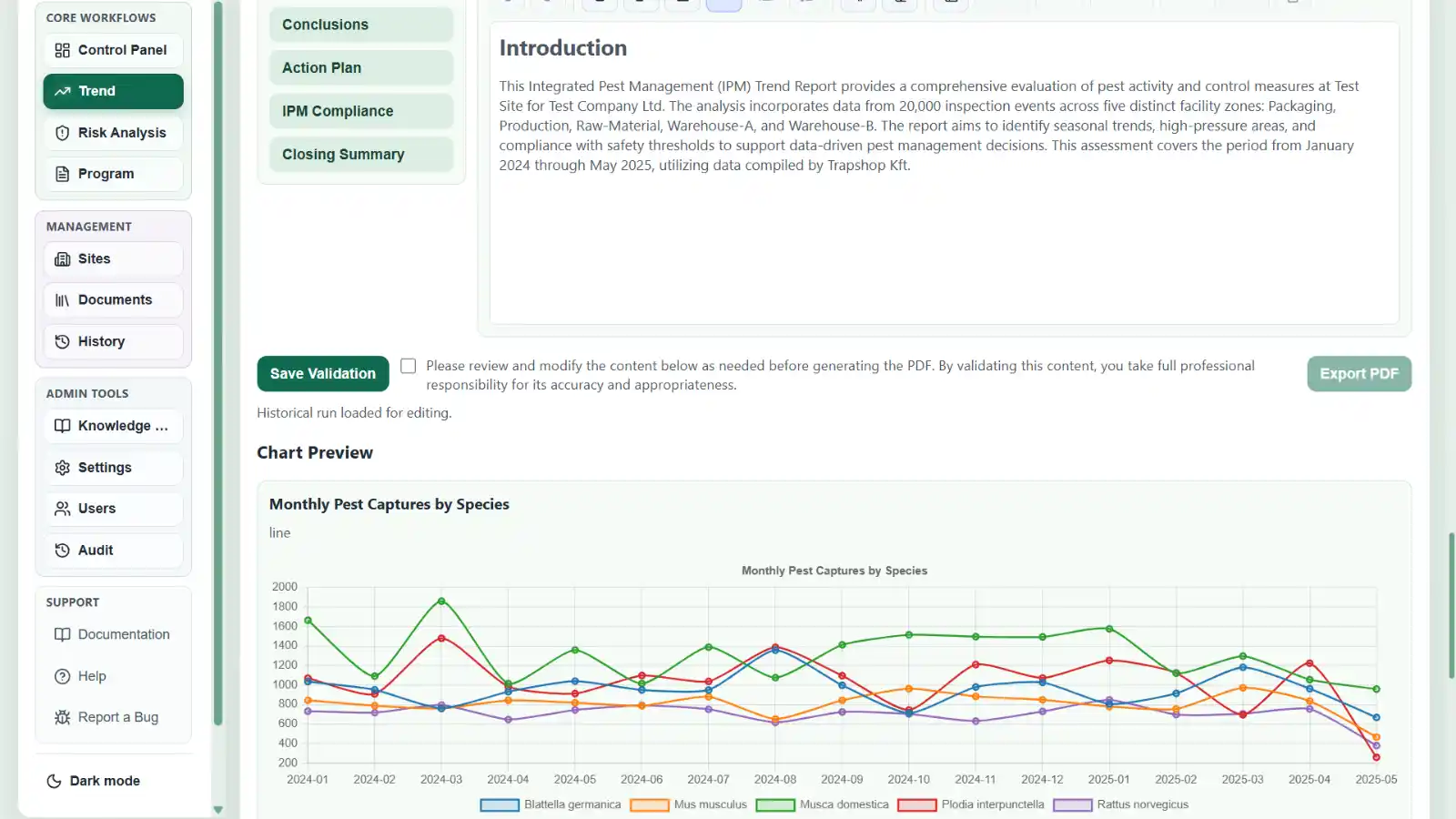
The Smart Trend approach solves this by having IPMFlow first organize, extract, and aggregate the data on the backend side, and only then use AI for interpretation and for drafting the professional narrative.
In practice, this means:
- Deterministic aggregations before the narrative: The system prepares the summary values and structured evidence points required for the trend in advance, so the numerical part of the report does not rely purely on model estimation. This matters especially when pest pressure must be assessed by species, device type, zone, or month.
- Lower prompt burden and a more focused AI task: The language model does not have to “guess through” the entire raw spreadsheet. Instead, it interprets a prepared, relevant data picture. That can reduce unnecessary token consumption with cloud models and help local models run more stably and efficiently.
3. How does this help pest control specialists and QA teams in practice?
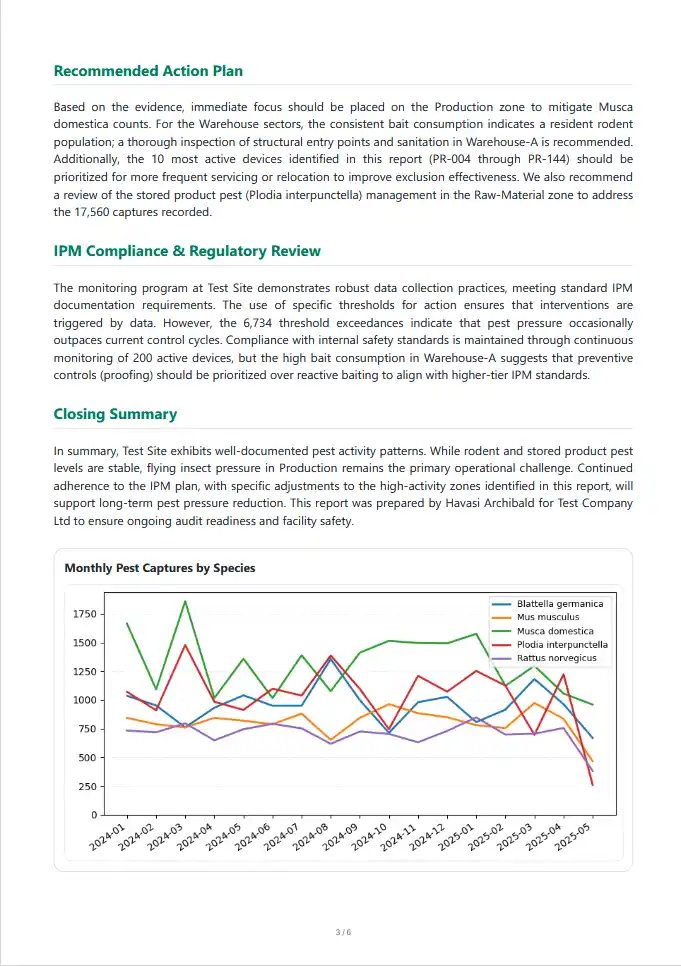
Good trend analysis does not simply mean “a nice chart was generated.” It means the technician, the QA lead, and the auditor all get a usable answer to the same question: where pressure is increasing, which species or device groups are problematic, what time-based pattern is emerging, and what action follows from that finding.
IPMFlow Desktop supports the expert in exactly that work. From uploaded exports, it can produce clear trend visuals, summary text, and report-ready findings, while final interpretation still remains a human responsibility. This is especially useful for annual reviews, audit preparation, or sites where multiple zones, multiple device types, and several pest categories must be evaluated together.
In an IFS or BRCGS context, the real value is that the trend does not remain a decorative chart. It can support the evaluation of control-measure effectiveness, the identification of recurring hotspots, and the professional justification for the next intervention steps.
Frequently Asked Questions (FAQ)
1. What is the advantage of using local AI models for pest control analysis?
Local models do not require the use of an external cloud AI service. With an appropriate setup, the data used for analysis can remain on-site, which is beneficial in environments where data flow, supplier-chain exposure, or auditability is a primary concern.
2. How is Smart Trend processing different from simply uploading a spreadsheet into a general chatbot?
Smart Trend does not treat the spreadsheet as raw text only. It first structures and aggregates the relevant data, then builds AI-assisted interpretation on top of it. This is a more professionally focused approach for large monitoring datasets than expecting a general chatbot to derive conclusions from the full export in one pass.
3. Are offline or local trend reports usable in IFS/BRCGS audit environments?
Typically yes, provided the report does more than list raw data and instead includes interpreted trends, documented findings, and a clear action logic derived from them. Auditors usually examine how the trend was evaluated and what steps were taken as a result, so final compliance always depends on the site’s own processes and expert validation.
Compliance note: IPMFlow provides audit-supportive structure, local data storage, and AI-assisted analysis options. Actual compliance depends on the implementation environment, organizational processes, the selected AI operating mode, and expert validation.
